

Understanding the components of your generator is critical to having a safely powered home or worksite. The individual parts of a Generac generator come together to make a fully functioning system that you can rely on. Learn all about what it means when you see your Generac light come on so you can quickly and safely identify and fix issues and address maintenance to keep your generator ready when you need it most.
What are Generator Indicator Lights?
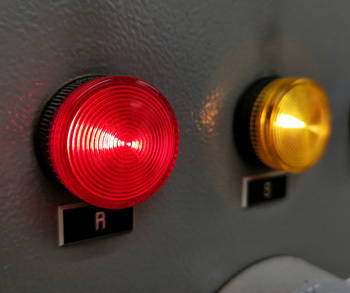 Generator indicator lights are small LED lights that show the state of your generator. These lights communicate alerts, updates, and the system's operating status through different colors and appearances. They alert you to whether your generator is running as it should or if there are any problems. Checking the color of your Generac lights allows you to see how the system is running and troubleshoot solutions.
Indicator lights are an easy way to take diagnostic control of your generator system into your hands and address issues in your machine. Generator indicator lights are an external display of how the system functions internally, giving generator owners confidence in their equipment.
It is essential to consult the indicator lights frequently to be aware of any changes to your generator unit. Refer to the Generac Diagnostic Manuals for help identifying issues and their solutions.
Where are the Generator Indicator Lights Located?
The LED lights are located on the control panel of your Generac generator. Depending on the model of your generator, the indicator lights are often behind a single translucent lens.
It is important that the view to your control panel is largely unobstructed so that there is easy access to your system and any visual indications that the generator may display. Because the generator control board displays crucial information, it is important to routinely check that it is working and replace it if necessary.
The Colors of Your Generator Indicator Lights
Three colors can be displayed on your Generac generator's control panel, showing different statuses:
- Green
- Yellow
- Red
Generator Green Indicator Light
A solid green Generac light means that your generator is operating correctly. The system is in good working order and should be performing as expected. Green indicator lights are the desired color and indicate that no immediate maintenance is required on your generator unit.
Yellow Generator Indicator Light
 A solid yellow Generac light means that your generator needs maintenance or a warning has been reported. This yellow indicator light is the "non-critical" status light, but it still indicates that something requires your attention.
This yellow indicator light may mean that scheduled maintenance on your generator is due, such as an air filter replacement or an oil change. Once you take care of the routine maintenance, pressing enter on the control panel should eliminate the yellow Generac light if that is the issue.
The yellow light may also indicate that the battery charge is running low or that the battery is not holding charge as it should, in which case the generator battery may need replacing. The system may also be running in exercise mode when the generator self-starts and runs to perform maintenance tests and ensure correct function, showing the yellow Generac light as a result of this test.
Red Generator Indicator Light
A solid red Generac light means that your generator is off and not functional or that a shutdown alarm is detected. A shutdown alarm senses vital faults in the system and automatically shuts the Generac generator down to prevent damage or injury. A red indicator light is the "Alarm" status of your indicator LEDs and requires direct attention.
The red light on your control panel may be fixed in a series of troubleshooting steps that can be taken before contacting professionals for help. If you do not feel comfortable checking such issues, contact a professional. Always ensure that your generator is turned off and disconnected from any power sources before continuing these checks, with safety being your number one priority.
- Battery assessment – is the battery charged and functional?
- Oil level – is the oil at the correct amount and clean?
- Routine maintenance – has all regular maintenance been conducted?
- Power load – is the power load too high for the generator?
- Engine temperature – is the generator overheated?
If these checks have all been completed yet the generator indicator light has stayed the same, you should consult your Generac generator handbook for more solutions and contact a professional for help. It is important to note that many red alarm Generac lights require the attention of an authorized service dealer.
Blinking Generator Indicator Lights
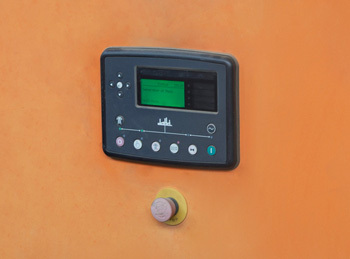 Your Generac system may display blinking generator indicator lights as a different form of communication. A flashing green light means the home has been converted to generator power during a power outage due to the automatic transfer switch. Your system is fully functioning, and the unit is running as intended. If you believe that your house should not be running on generator power, reach out to a professional for help.
If all your indicator lights are flashing, this may indicate that a generator exercise timer has not been set. An exercise timer must be set so that the generator may run routine tests. This exercise timer can be set up on the control panel of your Generac generator.
Multiple Indicator Lights on Generators
Multiple indicator lights may be illuminated at the same time. Different combinations of colors mean different things for your generator and indicate the best way to fix problems.
If the Generac lights display is half green and half yellow, your system runs correctly, but it is time for routine maintenance. If the control panel displays yellow and red indicator lights, then it means that there is a more complex issue.
Taking the meanings of the yellow and red indicator lights on their own, together they imply that a combination of influences is affecting the generator and its performance. Before attempting any troubleshooting, practice safety by turning off and unplugging your generator.
Consult your Generac diagnostic manual to attempt to turn both Generac lights off, starting with routine maintenance and resetting the maintenance reminder. If the yellow and red generator indicator lights are still displayed after attempted troubleshooting, contact a professional for help.
The Generac lights on your generator make you aware of the system status and its operations. By knowing what these lights signify, you can make decisions that will ensure the function and safety of your generator for years to come.